Low-end control
Tight Low End
Split the low band, collapse it to mono, add controlled harmonics, and dynamically tighten low-end movement around the crossover.
macOS AU/VST3 · Windows VST3 · Linux x64 VST3
How it works
A mono low-band processor with adaptive ducking.
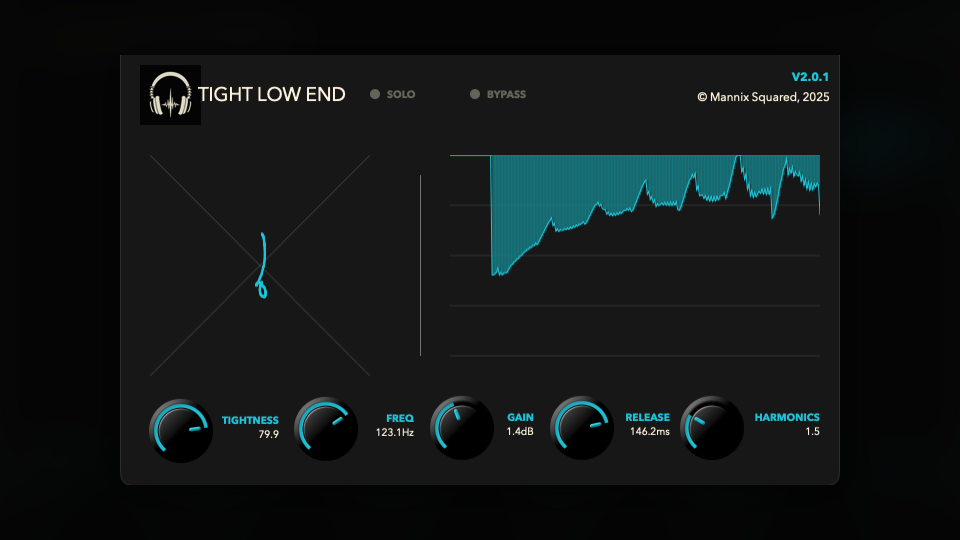
Tight Low End separates the low band, centers it, adds controlled harmonic weight, then reduces excess low-frequency movement before blending it back with the rest of the signal.
- Cut OffSets the top of the low band from 20 Hz to 500 Hz. Everything below the cutoff is treated as the focus area.
- Tightness and ReleaseTightness controls the maximum adaptive reduction, up to 6 dB. Release sets how quickly the low-band envelope recovers from 20 ms to 250 ms.
- Harmonics and GainHarmonics adds extra low-band character and audibility, while Gain adds up to 6 dB after processing.
- Solo Low End and EnabledSolo Low End monitors only the processed low band. Enabled bypasses the full processor, while Solo Low End can still be used for checking the low-pass band.
How to use it
Tune the split, then tighten the movement.
Use it on bass, kick, low synths, or a low-heavy bus when the bottom end feels wide, uneven, or hard to translate.
- Set Cut Off in contextMove the cutoff until the unstable low-end area is inside the processed band, usually around the kick and bass fundamental range.
- Use Solo Low End brieflyCheck what the processor is hearing, then turn solo off before making final decisions.
- Raise Tightness graduallyIncrease Tightness until the low band stops blooming too much, then adjust Release so the recovery follows the groove.
- Add Harmonics only if neededUse Harmonics to make the low band speak on smaller speakers, then trim the final level with Gain.
Free download
Included in the full Mannix² bundle.
Download Tight Low End with the rest of the free plugin collection for macOS, Windows, and Linux.