Side-chain workflow
Quick Chain
Use a sidechain envelope to drive a dynamic peak, shelf, or ring-mod style attenuation on the main signal.
macOS AU/VST3 · Windows VST3 · Linux x64 VST3
How it works
A sidechain-controlled dynamic filter.
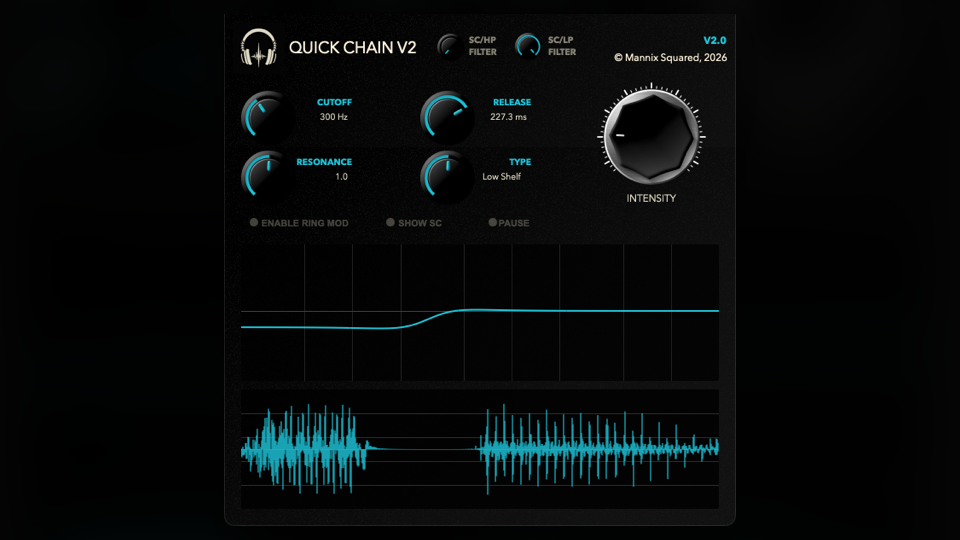
Quick Chain listens to the sidechain, follows its level movement, then uses that movement to duck a selected frequency shape on the main input.
- HPFilter and LPFilterLimit what the sidechain listens to from 20 Hz to 20 kHz, so the trigger can ignore rumble, spill, or brightness that should not drive the ducking.
- Type, CutOff, and ResonanceChoose Peak, Low Shelf, or High Shelf for the main-signal ducking filter, then set its frequency and resonance.
- Release and IntensityRelease controls envelope fall time from 1 ms to 1000 ms. Intensity scales the ducking amount from subtle to extreme.
- Ring ModEnable Ring Mod for a more chopped, reactive effect where the trigger becomes part of the sound rather than just a control signal.
How to use it
Choose what should duck, then choose how.
Quick Chain belongs on the track that needs to move out of the way. The sound that should cause the movement goes to the sidechain input.
- Route the triggerSend a kick, vocal, snare, or rhythmic source into the sidechain and insert Quick Chain on the target track or bus.
- Filter the detectorUse HPFilter and LPFilter so the envelope reacts to the part of the trigger that matters, not spill or sub energy.
- Pick the filter shapeUse Low Shelf for kick-versus-bass space, Peak for a narrow carve, or High Shelf when the top end should duck around a lead.
- Set feel with Release and IntensityShort releases make obvious movement; longer releases feel smoother. Add Ring Mod only when you want the trigger to become part of the sound.
Free download
Included in the full Mannix² bundle.
Download Quick Chain with the rest of the free plugin collection for macOS, Windows, and Linux.