Distortion and motion
Mannix Phat
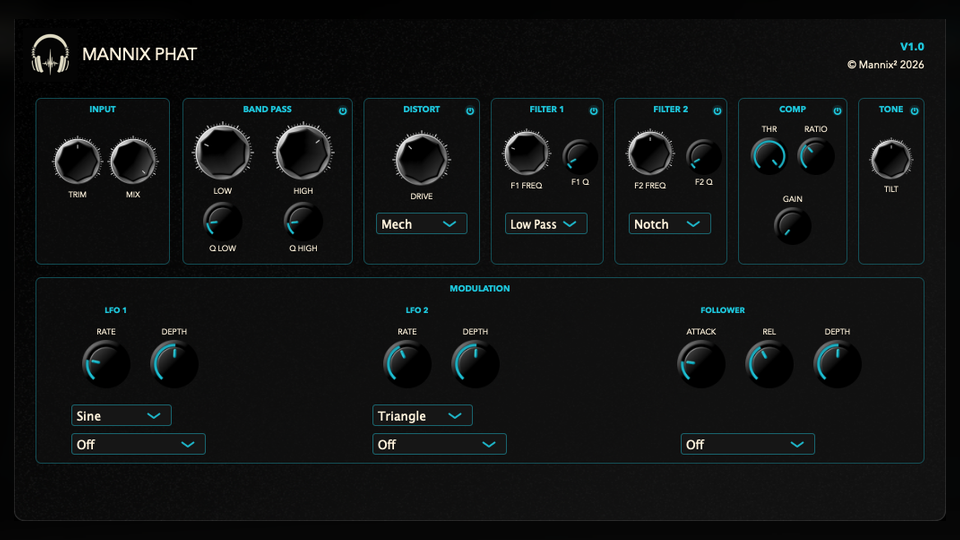
A full character chain: input trim, resonant band window, distortion, two filters, compressor, tilt EQ, and three modulation sources.
macOS AU/VST3 · Windows VST3 · Linux x64 VST3
How it works
A multi-stage processor for distortion and motion.
Mannix Phat is a complete sound-shaping chain. It lets you set the input level, choose the frequency range to emphasize, add distortion, shape the result with filters, compress it, tilt the tone, and add movement.
- Input, Mix, and Band PassInput Trim sets how hard the chain is driven, Mix blends the processed sound with the original, and the Band controls choose which frequency range is emphasized.
- DistortionDrive runs from 0 dB to 36 dB with modes including Mech, Bit Crush, Tube, Overdrive, Hard Clip, Soft Clip, Sine Fold, Diode, Fuzz, Rectify, and Asym.
- Filters, compressor, and toneTwo enabled filters can be set independently to modes such as low-pass, high-pass, notch, peak, comb, ladder, formant, phaser, and state-variable. The compressor has Threshold, Ratio, and Makeup, followed by Tone Tilt.
- LFOs and envelopeTwo LFOs and one envelope can move selected controls over time, including Mix, band range, Drive, filter settings, compressor settings, and Tone Tilt.
How to use it
Build the chain from left to right.
Mannix Phat can get extreme quickly, so it helps to choose the driven frequency range before pushing Drive or modulation.
- Set gain and blendUse Input Trim to decide how hard the chain is hit, and keep Mix below 100% if you want parallel weight rather than a fully replaced sound.
- Choose the band windowUse Band Low and Band High to decide what range is fed into the character chain, then adjust the resonance controls if the edges need more emphasis.
- Pick a distortion modeUse softer modes for density, clipping or folding modes for aggression, and Bit Crush or Rectify when you want the processor to become a sound-design effect.
- Shape after distortionUse Filter 1 and Filter 2 to remove harshness, make a resonant sweep, or create a more obviously synthetic tone before compression and Tone Tilt.
- Add movement lastAssign LFO 1, LFO 2, or Envelope to one clear target at a time, then set Depth so the movement supports the part instead of making the chain hard to control.
Free download
Included in the full Mannix² bundle.
Download Mannix Phat with the rest of the free plugin collection for macOS, Windows, and Linux.