Peak control
Detail Preserving Clipper
Control peaks while keeping more of the snap, brightness, and edge that can disappear when clipping gets too blunt.
macOS AU/VST3 · Windows VST3 · Linux x64 VST3
How it works
A clipper with a separate detail path.
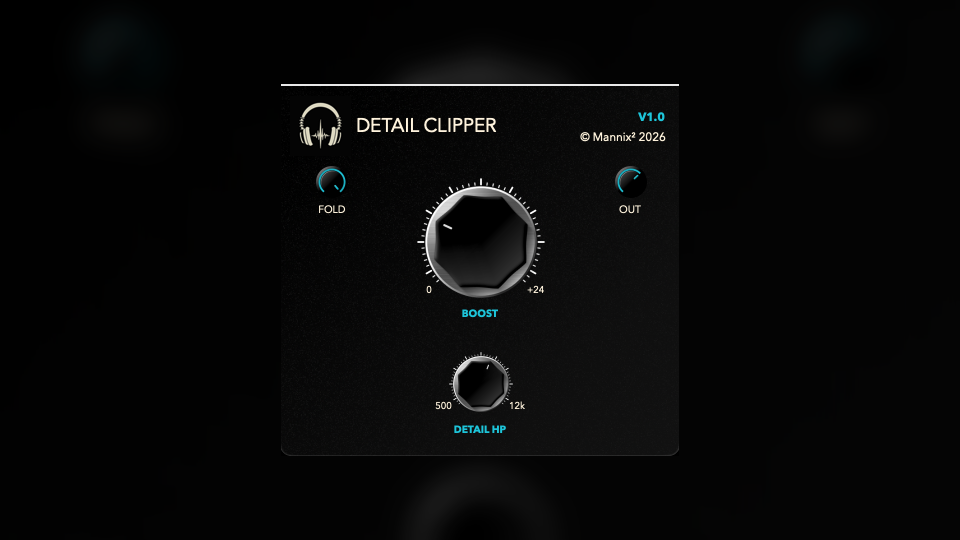
Detail Preserving Clipper drives the signal into clipping, then uses a separate detail control to keep the clipped result from feeling too flat or dulled.
- BoostDrives the signal into clipping from 0 dB to 24 dB. More Boost means stronger peak control and more clipping character.
- Detail FrequencySets the high-pass point for the detail path from 500 Hz to 12 kHz. Higher settings preserve only brighter edge; lower settings include more upper-mid snap.
- FoldbackControls the detail-path contribution from 0% to 100%. At higher settings, more of the high-frequency detail path is folded around the clipped signal.
- OutputApplies final output gain from -24 dB to +12 dB after clipping and detail foldback.
How to use it
Drive the peaks, then restore the edge.
Use it on drums, percussion, buses, or mix elements where clipping is useful but dullness is not.
- Loop the hardest transientFind the hit or section that makes the limiter work, then raise Boost until the peak is controlled.
- Set Detail FrequencyMove it lower when the clipper is flattening attack, or higher when you only want to preserve air and brightness.
- Raise Foldback carefullyIncrease Foldback until the clipped signal regains articulation, then stop before the high end becomes brittle.
- Trim Output for comparisonUse Output to level-match bypass, especially when deciding whether the extra level is worth the tone change.
Free download
Included in the full Mannix² bundle.
Download Detail Preserving Clipper with the rest of the free plugin collection for macOS, Windows, and Linux.