Reference checking
AB Reference
Load a reference file, level-match it, loop the useful section, and switch between the session input and the reference from inside the plugin.
macOS AU/VST3 · Windows VST3 · Linux x64 VST3
How it works
A direct A/B switch with focused listening.
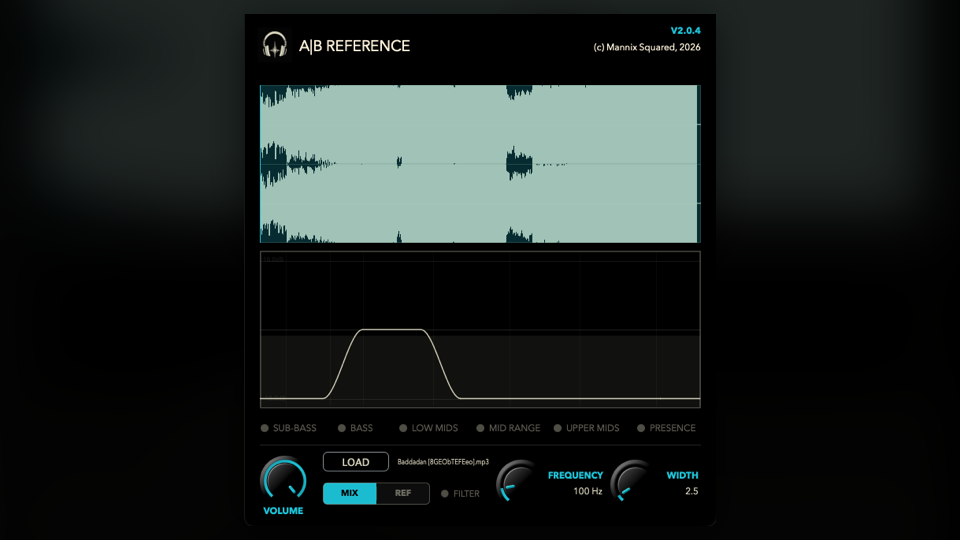
AB Reference plays an imported reference file inside the plugin. When A/B Test is on, the loaded reference replaces the live input at the output so the comparison is immediate.
- A/B TestSwitches monitoring from the incoming session audio to the loaded reference file. The reference loops between the selected loop start and loop end points.
- Reference VolumeTrims the reference from -24 dB to 0 dB, with smoothing so level changes do not click.
- Enable FilterAdds a focused listening filter after the A/B switch. Frequency chooses the area you want to inspect, while Width controls how wide that listening band is.
How to use it
Level-match before you judge.
Use it near the end of the monitoring chain or mix bus, where you can compare the whole mix against the reference without changing the session routing.
- Load the referenceImport the track, rough mix, or alternate bounce you want to compare against, then choose the section that matters and let it loop.
- Set Reference VolumePull the reference down until it feels like the same loudness as your mix. This avoids chasing the louder signal.
- Use the filter for narrow checksEnable Filter when you want to isolate a band, such as low-end weight, vocal body, or top-end brightness, then switch it off again for the full mix comparison.
Free download
Included in the full Mannix² bundle.
Download AB Reference with the rest of the free plugin collection for macOS, Windows, and Linux.